내 컴퓨터에서 실행할 수 있다는 양자화 모델을 이용해 보기로 했다.
프로그램이 추천해 준 모델은 medgemma-1.5-4b-it 이다.

google/medgemma-1.5-4b-it · Hugging Face
We’re on a journey to advance and democratize artificial intelligence through open source and open science.
이것을 그대로 이용할 수는 없다. 다른 사람들이 양자화시켜둔 것을 이용해야 한다고 한다.
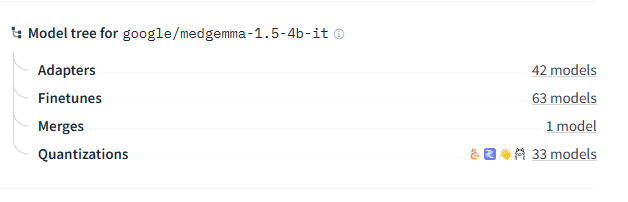
마지막 중 Quantizations의 33 models를 클릭한다.
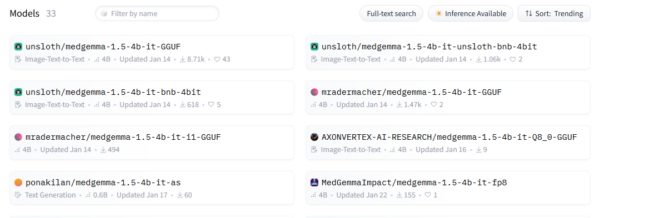
첫 번째를 선택해 본다.
Use this model 에서 ollama를 선택 한 후 모델을 지정한다. 처음 AI가 추천해 준 ollama run hf.co/unsloth/medgemma-1.5-4b-it-GGUF:Q5_K_M 를 이용해 본다.
docker exec -it ollama ollama run hf.co/unsloth/medgemma-1.5-4b-it-GGUF:Q4_K_MOpen WebUI 에서 파일을 읽어와도 된다. CLI 환경에서는 다음처럼 이용할 수 있다.
docker exec -it ollama ollama run hf.co/unsloth/medgemma-1.5-4b-it-GGUF:Q4_K_M "Please read this X-ray /root/.ollama/001_00001.jpg"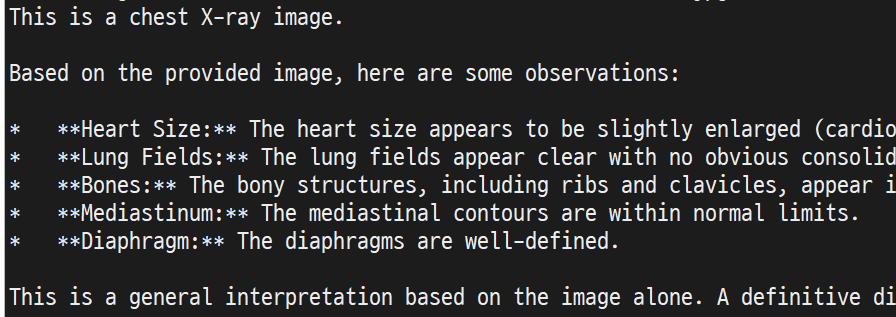
그럼 이렇게 결과가 나온다.